In less than 6 months time we will release Xubuntu 14.04 Trusty Tahr, a long-term release which will be supported for 3 years. Even if you have never dabbled in testing – now is the time to have a go!
How can I help?
Testing Xubuntu is an important step on the way to the release of a stable operating system. With proper and reported testing we are able to find out the bugs and issues and iron them out before the final release.
You can find a basic overview of how testing is set up at the Ubuntu QA wiki, but do bear in mind that our requirements are more specific and some of that page is aimed at Ubuntu testing.
We have two different areas of testing, which vary in depth and length. This makes it easy to find a test suitable for your schedule and skills, but remember: only reported tests count! You can help us with testing either
Updates to our testing requirements are made regularly to the development mailing list. However, please do not hesitate to be in contact if you are in doubt; we will gladly help.
Finally, you can get more details on how to participate with Xubuntu quality assurance generally here.
We’re happy to announce that for 14.04 we plan to integrate a set of good-looking wallpapers by default. This is a feature many have been lacking for a while, we repeatedly heard/read about it in reviews. And we think the upcoming 14.04 LTS release is the perfect time to finally tackle this issue.
We want the community (yes, you who is reading this!) to participate in this process – so we’re looking for your wallpaper submissions!
What kind of wallpapers?
We’ve put together a page with guidelines – please follow them as closely as possible. Note: The wallpapers have to have the appropriate license, which is CC-BY-SA. Submissions that violate those guidelines gravely (e.g. posting sexually explicit images) will be removed from the submissions page without further notice.
If you’ve participated in Ubuntu’s wallpaper contest, these guidelines will look familiar to you.
Decision making
Our decision making will be transparent, i.e. public and out in the open (we’ll hold an IRC meeting in #xubuntu-devel when the decision is due). However, it will be a decision taken by the Xubuntu artwork team, so it’s not a wallpaper contest in the sense that everyone with internet access will get to vote.
Our goal is to have a multifaceted set of wallpapers – with respect to motifs and colors (e.g. not “all blue”, “only pictures of sky+clouds”). It is hard to say before seeing the final list of submissions how this might change our decision, but it will certainly affect it. (Just to let you know in advance.)
We haven’t decided on the amount of wallpapers to include; ultimately, it also depends on the amount of submissions.
Where and how to submit
You can submit your wallpapers by uploading them to the Xubuntu Wiki. You’ll need an Ubuntu Single Sign-On account to be able to attach wallpapers.
Important: Please always include the authors’ credit and a link to the original (we need to double-check and possibly get in touch with the authors)!
The Xubuntu team hears stories about how it is used in organizations all over the world. In this “Xubuntu at..” series of interviews, we seek to interview organizations who wish to share their stories. If your organization is using Xubuntu and you want to share what you’re doing with us please contact Elizabeth Krumbach Joseph at lyz@ubuntu.com to discuss details about your organization.
Back in September we heard from Chris Wiley of Techs for a Cause and were put in touch with Justin Henneberg to answer some questions about their organization and how they use Xubuntu. Justin replied with an exceptionally thoughtful and inspiring reply which we’re happy to share here.
“We are a small group of like minded individuals that have a strong belief in decreasing the digital divide. In other words, we are dedicated to helping others gain access to an essential part of modern life - a computer. We also want to do the right thing for the environment by keeping otherwise good computer components out of landfills. Working with computers is a hobby for us. None of us are employed in the IT field, and each of us have our own unique backgrounds. For example, one of us drives a truck for a living, another works in a local school district, and another does adult foster care with developmentally disabled adults.
“Our choice to use Linux was a conscious (and logical) decision since it is an open-source operating system, and we have no official budget or source of income. We chose Xubuntu in particular because of the large repositories offered through Ubuntu and Synaptic. It offers the low resource requirements that run best with the systems we rehab, and is balanced with more functionality and ease of use than some other distros such as Lubuntu.
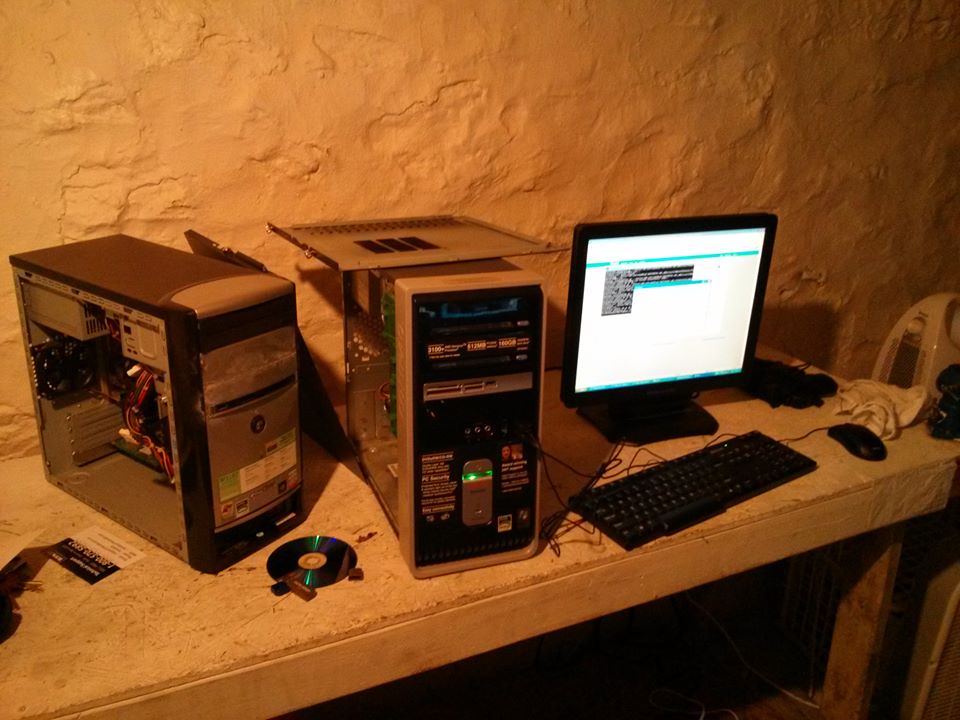
Techs for a Cause systems
“Personally, I believe in open-source because it is a gateway for innovation, accessibility, and equality. Open-source software is the future, as can already be seen by the explosion of the Android fork of Linux. Android had become what it is, because it is open-source. There are many great programs that are open-source, and they often are better than the paid versions because it is passion, rather than profits that drive them.
“A couple of final great things about Linux: You get the opportunity to learn! If you aren’t learning, you aren’t living. Lower virus exposure (not as many viruses are written for Linux due to market share) coupled with increased security measures. I truly could go on and on about the benefits of Linux and open-source, but so many of the things I would say would be redundant and obvious, needless to say I LOVE Linux!”
We want to thank all of our contributors: keep up the good work! The development status along with a full list of work tasks done by the team and other contributors, including many tasks not directly visible to our end-users, can be found at http://status.ubuntu.com/ubuntu-s/group/topic-s-flavor-xubuntu.html. To find out more about how to contribute to Xubuntu and join in as we get ready to develop a new long-term support (LTS) release, see the Get Involved section.
If you find bugs in Xubuntu, please file them through the automatic reporting process or by manually running ‘ubuntu-bug packagename’. To read more about reporting bugs, please refer to https://help.ubuntu.com/community/ReportingBugs.
The Xubuntu team is glad to announce the release of Xubuntu Saucy Salamander Beta 2! Please note that this beta is not suited for production machines. Always back up your data before upgrading.
With this beta, we hope to have most of our important features ready as well as most of the critical bugs fixed. The team has worked hard triaging and fixing bugs and we are happy to have been able to ship fixes for many bugs.
Some of the highlights for the Saucy Salamander beta 2 include:
A new version of xfce4-settings has been uploaded bringing amongst other things a new dialog to set up your displays
A tool for changing your theme colors easily, gtk-theme-config, has been added to the default installation
New wallpaper
New releases of our Gtk themes (with Gtk3.10 support) as well as the LightDM greeter, fixing many visual bugs
We want to send thanks to all of our contributors, especially those who helped make the Beta 2 testing cover much more ground than Beta 1. Keep up the good work! The development status along with a full list of work tasks done by the team and other contributors, including many tasks not directly visible to our end-users, can be found at http://status.ubuntu.com/ubuntu-s/group/topic-s-flavor-xubuntu.html. To find out more about how to contribute to Xubuntu and join in, see the Get Involved section.
To report a bug, please let the automatic reporting process work its way through. For when that doesn’t happen, please run ubuntu-bug followed by the package name to make a report. For example, to file suggestions for improving our offline documentation, please run ubuntu-bug xubuntu-docs from the command line.
The final release of Xubuntu 13.10 is set for October 17, 2013.